NZ TRANSPORT AGENCY WAKA KOTAHI OPEN DATA SETS
NZ Transport Agency Waka Kotahi
New Zealand Vehicle Fleet Open Data Sets
Guidance/Instructions
New Zealand vehicle fleet open data sets
The New Zealand vehicle fleet open data provides a point-in-time ‘snapshot’ of all vehicles currently registered in New
Zealand at a point in time. The data relates to registered vehicles as recorded on the Motor Vehicle Register (MVR)
and is updated monthly, so data is accurate as at the end of each month, before the next data set is uploaded. This
data is released in an open format in line with Open and Transparent Government principles.
Prerequisites
• NZ vehicle fleet – raw open data for specialist use and is approximately 1.6 million lines.
It may take 20 odd minutes to download and will require Power Bi application or similar to open.
Getting started …
[Choose data set best suited to your research]
If…
Then…
1.
Go to
New Zealand vehicle fleet:
https://www.nzta.govt.nz/resources/new-zealand-vehicle-fleet-raw-
For specialists or industry groups who open-data-for-specialist-use/
prefer raw data ie not algorithmically
cleaned, please see New Zealand
vehicle fleet – raw open data for
specialist use
2.
Go to
Motor vehicle Register: provides information about
all
https://opendata-
currently registered vehicles as
nzta.opendata.arcgis.com/maps/b478451bc4f0441d83cf11fefe02065f
recorded on the Motor Vehicle
Register (MVR) at the end of each
under the Official Information Act 1982
month. Data includes 13 categories of
vehicle information and region of
vehicle registered.
3.
Go to
Released
Motor vehicle registrations
https://www.nzta.govt.nz/vehicles/how-the-motor-vehicle-register-
dashboard:
affects-you/motor-vehicle-registrations-dashboard-and-open-data/
shows all first time
new, used and re-
registered vehicle registrations in
New Zealand, by month, for the past 5
years.
NZ TRANSPORT AGENCY WAKA KOTAHI OPEN DATA SETS
1. New Zealand Vehicle Fleet – raw data for specialists
The raw New Zealand vehicle fleet open data provides a version of the New Zealand vehicle fleet open data that has
not been algorithmically cleaned.
Other than in very specialist circumstances, we recommend using the cleaned version of the data in which identified
errors (such as spelling mistakes and other free text field inputs subject to human error) have been corrected.
We release this ungroomed data to maintain consistency with our legacy subscription service, and it is primarily of
interest to industry groups who use this service.
1982
This dataset is updated monthly at the same time as the algorithmically cleaned data.
Act
Format and files
This data is provided in a comma separated value ‘.csv’ file to meet open data standards. Please be aware that when
unzipped this is a very large file and some systems may have difficulty opening it. Please also note that this file exceeds
row limitations of programmes such as Microsoft Excel.
The data relates to the current vehicle fleet, as at the end of the current month.
Links:
Information
For raw open data for specialist use this link
- https://www.nzta.govt.nz/resources/new-zealand-vehicle-fleet-raw-
open-data-for-specialist-use/
To access the
cleaned data version, visit
- https://www.nzta.govt.nz/resources/new-zealand-motor-vehicle-register-
statistics/new-zealand-vehicle-fleet-open-data-sets/
Official
For
vehicle data all years, use this link -
https://nztaopendata.blob.core.windows.net/motorvehicleregister/Raw-
fleet-data-all-vehicle-types.zip
the
Vehicle Data, all years
A note about the 'Vehicle data – all veh
under icle years' file
This contains all currently registered vehicles in New Zealand. It is important to note, though, that given that this
file contains approx. 5.7 million rows, it will need to be opened in PowerBI, R or similar.
Please be aware that when unzipped this is a very large file and some systems may have difficulty opening it. It
won’t work in Excel. However, the file is in CSV format, and will work in:
Released
•
programming languages such as R or Python
•
databases with SQL.
If you select the vehicle year, you will be able to download an Excel file of current registered vehicles by year of
manufacture, model year or year of first registration in New Zealand or internationally. When you open the CSV file in
Excel, every column will be set to the same default width, which causes the contents of some columns to be partially
hidden and difficult to read.


NZ TRANSPORT AGENCY WAKA KOTAHI OPEN DATA SETS
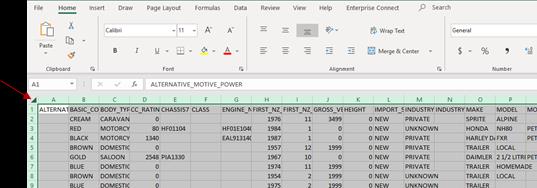
To show the full content of each column, please follow the steps below:
Step 1:
Click on the area indicated by the red arrow below (triangle shape between column A and row 1) to quickly select all
rows and columns in the spreadsheet.
1982
Act
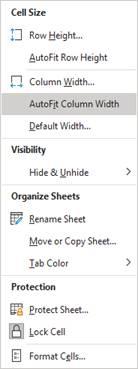
Step 2:
Once all rows and columns are selected, click on Format from the main menu (Home tab) as shown by the red arrow
below.
Information
Step 3:
Official
Select AutoFit Column Width from the drop-down menu. This selection will automatically adjust all column widths so
that their contents are completely visible as illustrated below.
the
under
Released
NZ TRANSPORT AGENCY WAKA KOTAHI OPEN DATA SETS
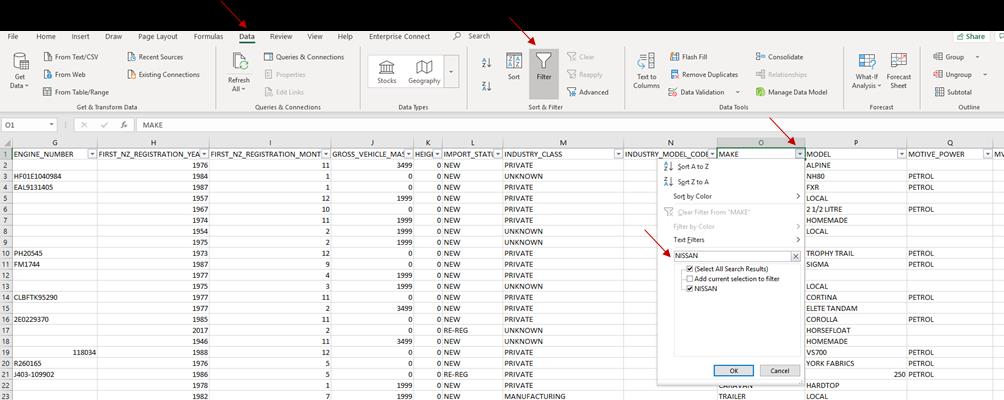
As an example, you can filter by make, model, vehicle year and body type (data tab - filter):
• Column C (BODY TYPE)
• Column O (MAKE)
• Column P (MODEL)
• Column AF (VEHICLE YEAR)
1982
Act
Information
Official
the
under
Released

NZ TRANSPORT AGENCY WAKA KOTAHI OPEN DATA SETS
2. Motor Vehicle Register
Step 1.
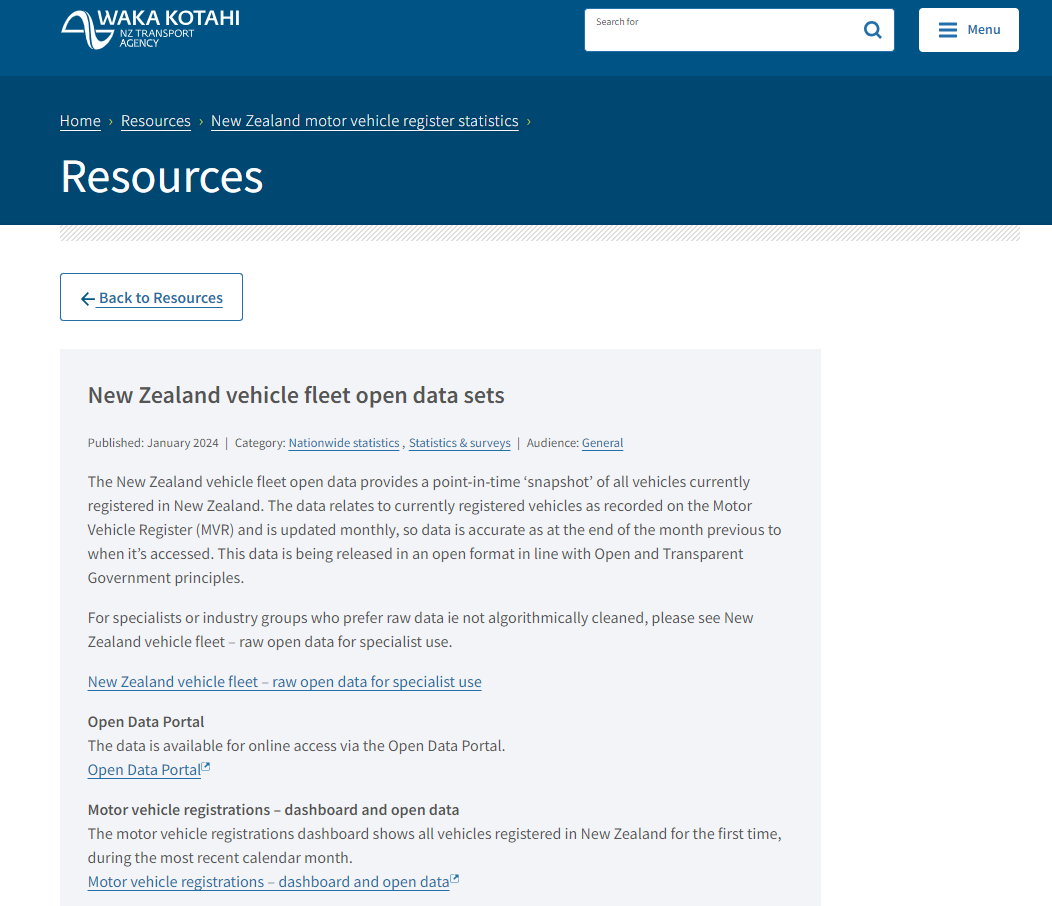
All open data sets can be found via the NZ Transport Agency website. To access the open data sets, you can click
onto Resources and follow the prompts to take you to the New Zealand vehicle fleet open data sets.
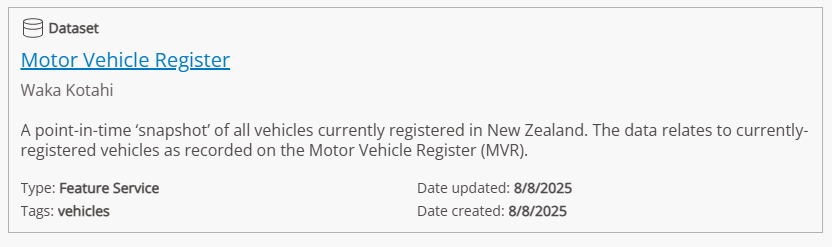
This data set provides a point-in-time ‘snapshot’ of all vehicles currently registered in New Zealand. The data
relates to currently registered vehicles as recorded on the Motor Vehicle Register (MVR).
1982
We update the data monthly, so it's accurate up to the end of the previous month.
Here’s a quick link
– https://opendata-nzta.opendata.arcgis.com/maps/b478451bc4f0441d83cf11fefe02065f
Act
Information
Official
the
under
Step 2. Click onto the Open Data Portal link:
Released
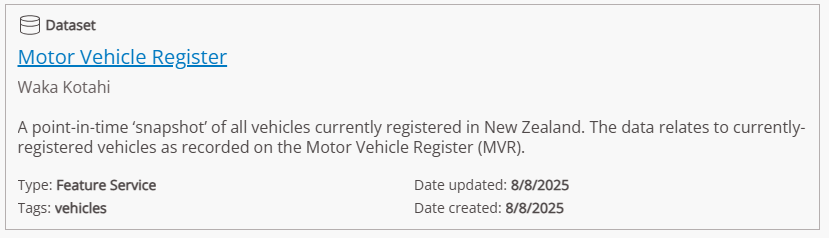
This will open a catalogue of data that is available on open data portals. Scroll through the options until you find –
Motor Vehicle Register.
NZ TRANSPORT AGENCY WAKA KOTAHI OPEN DATA SETS
Step 3. Click onto the link – Motor Vehicle Register.
1982
Act
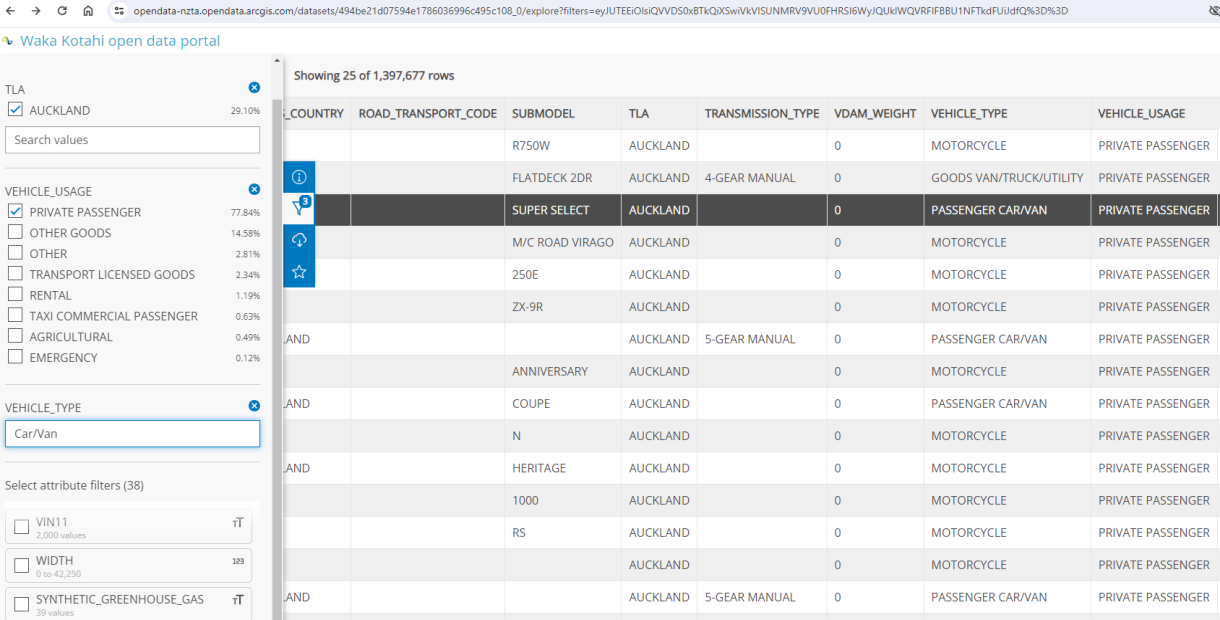
This opens the open data portal that holds the information of currently registered vehicles within the Motor Vehicle
Register. Click on the Information tab and it provides a full description of this data set and what updates occur.
It is important to remember that this data relates to vehicles, not people. All information provided is what we can
provide, while protecting the registered persons ownership details.
This data can be filtered to specific search values, these are within the drop-down boxes and appear in
green font.
Information
Please note: that the filter buttons take some time to load, so patience is needed when working to apply search
values within the chosen filters applied.
Step 4.
From this data, you can create charts and download excel spreadsheets. You can apply the filters required to cut
Official
and dice the data as you need.
the
under
Released

NZ TRANSPORT AGENCY WAKA KOTAHI OPEN DATA SETS
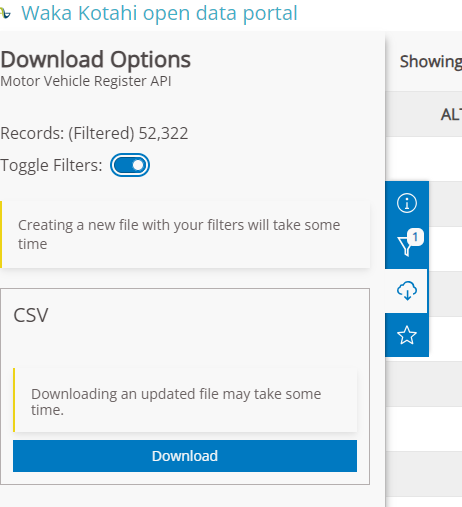
To download your data set, be sure to apply the toggle for downloading the filtered data set.
1982
Act
There are more detailed instructions that can be found on the website, including data field descriptions and how to
download data as zipped CSV files. Please refer to the
tab.
Information
Official
the
under
Released
NZ TRANSPORT AGENCY WAKA KOTAHI OPEN DATA SETS
3. Motor Vehicle registrations – dashboard and open data
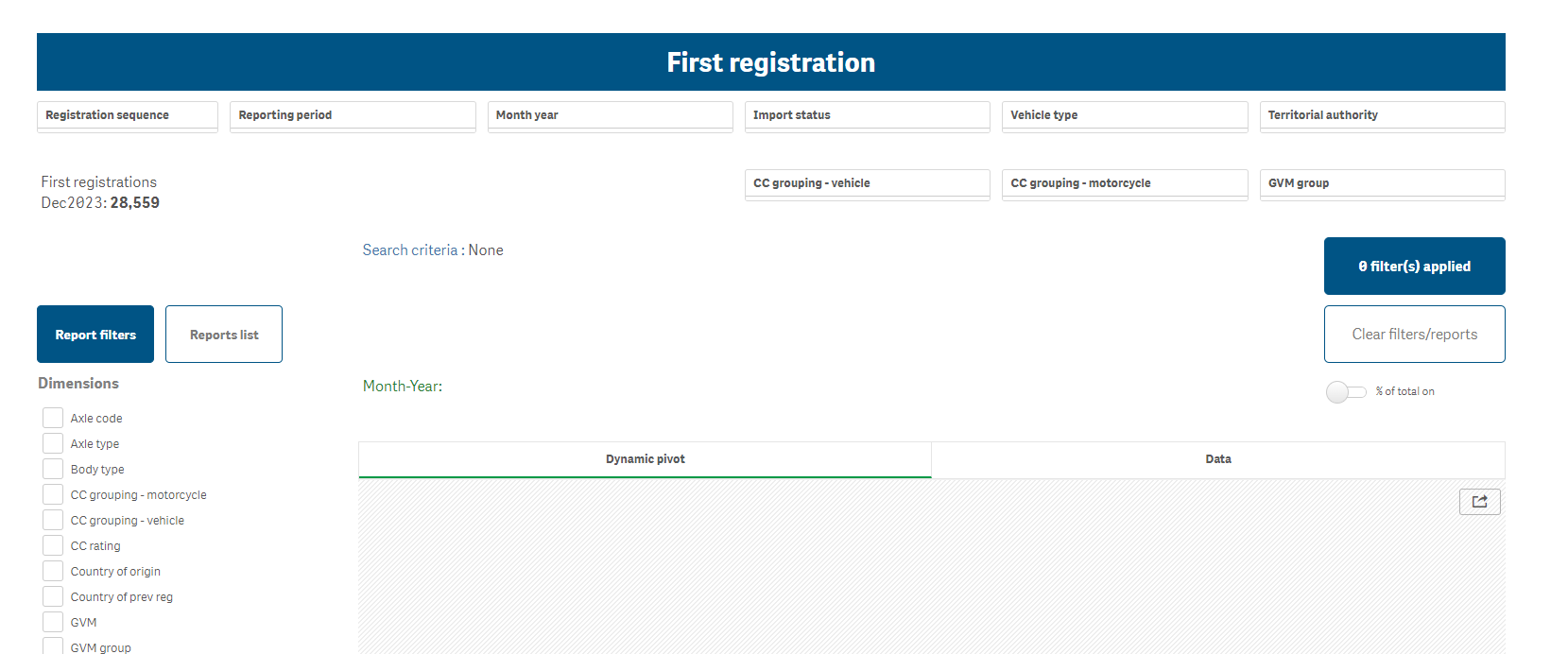
The motor vehicle registrations dashboard shows
only vehicles registered in New Zealand for the first time, during
the
most recent calendar month. It also shows a subset of reregistered vehicles – full reregistration data will be
available in the future. The dashboard is designed for websites, please be aware it is not ideal to use on smart devices.
You can filter and analyse the data using one or many dimensions – for explanations of each, see the list of dashboard
term definitions below.
You can export the data by clicking on the 'export data' icon at the top right of the dashboard.
1982
The User Guide:
Act
Link to the User guide is here - https://www.nzta.govt.nz/assets/Vehicles/docs/motor-vehicle-registrations-
dashboard-user-guide-v2.pdf
Link to the training video is here - https://www.youtube.com/watch?v=GdyVTNT_DXI&t=3s
Release updates are noted for each month this dashboard is updated.
Note: These numbers are a snapshot of the data at the end of every month. Some attributes may have an
“undefined” value. This happens when the data isn’t recorded initially but is updated after first registration.
The dashboard is user friendly and once you apply the required filters, will provide the information available.
Information
Official
the
under
Released
