link to page 18
 Guidance: How we respond to Official Information
Act requests
Guidance: How we respond to Official Information
Act requests
The
Official Information Act 1982 (OIA) al ows people to request official information held by
Te Whatu Ora. When you prepare a response to an OIA request you have a direct and instant
impact on democracy in New Zealand. You are pulling together a package of information for
release to a New Zealander who wants to know more about the important work we do.
This guidance assists us to respond to requests for information under the OIA.
To help you quickly navigate this guide, we have colour coded the steps in the process. This
will help you quickly find the section you need when preparing a response:
Step 1
Request received by OIA team
Step 2
Triage the request
Step 3
Scope the request
Step 4
Commission the request
Step 5
Draft the response
Step 6
Consultation with others
Step 7
Review the draft response
Step 8
Sign out the response
Step 9
Send the response
under the Official Information Act 1982
Remember to also refer to ou
r related documents section for a list of handy links to help you
throughout the process.
Purpose of the OIA
The key purposes of the OIA are to:
Released
• progressively increase the availability of official information to the people of New
Zealand to:
o
enable more effective public participation in the making and administration of

laws and policies; and
o promote the accountability of Ministers and officials; which will enhance
respect for the law and promote good government; and
• protect official information to the extent consistent with the public interest and the
preservation of personal privacy.
1982
The key purposes of the OIA reflect competing interests between making information
available and protecting it where necessary. This means we must balance:
•
Act
considerations which favour releasing information; and
• considerations which favour refusing requests for information.
There is, however, a presumption that official information will be released. This presumption
should guide all of those working on an OIA through to its conclusion.
OIA requests must meet certain criteria
Information
An OIA request happens when an eligible person asks us for access to specified official
information. The OIA contains rules for how such requests should be handled and provides
requestors a right to complain to the Ombudsman in certain situations. It also provides
criteria that OIA requests or responses must meet, including:
Official
• Official information is any information held by Te Whatu Ora. This includes non-
documentary information such as drawings, graphs, audio files, photographs, and
the
videos.
• OIA requests can be made by any person located in New Zealand or any New
Zealand citizen. This includes Members of Parliament, the media, and the public.
under
This does not formally change the status of the request under the OIA. There are a
few requests, however, that do:
o a request for internal rules affecting decisions (Part III of the OIA);
o a request from a person for a statement of reasons why a decision was made
about them (Part III of the OIA); or
Released o a request from a company for information about itself (Part IV of the OIA).
• A request can be made in any form, does not need to refer to the OIA and can be

made to anyone who works at Te Whatu Ora.
• To be a valid request, the information sought must be ‘specified with due
particularity’. This means that we must be reasonably able to identify what
information is being requested.
• The principle of
availability underpins the OIA. This principle states that information
should be released unless there is ‘good reason’ to withhold it. While it recognises
1982
there may be good reasons to withhold information, we must start from the
assumption that all information in scope of a request will be released. When we do
Act
withhold information, we usually need to balance the harm that would be caused by
its release with the public interest in its release.
It's also important for us to remember:
•
Media requests are still OIA requests if they are asking for information held. If they
are asking for comment or for information we have to create to be able to respond,
then these sit outside the OIA.
Information
• People may ask for information about themselves. This is often covered by the
Privacy Act 2020 rather than the OIA, and should be referred to our Privacy team. You
can find out more about how our organisation responds to privacy requests here.
Official
There are two ways we can receive an OIA
We manage two types of OIA requests:
the
1. Te Whatu Ora requests – these are requests received from the public.
2. Minister requests – these are requests received by the Minister’s Office which we
have been asked by the Minister’s Office to process. These requests are forwarded
under
to us by the Minister’s Office. We prepare a response and forward it back to them.
Within these types of OIAs, there are three categories for how we manage the request:
1.
National Office: Our team of advisors lead a request where information is held by
Directorates.
2.
Ministerial: where a request to a Minister is being managed by a National Office
Released
advisor on behalf of that Minister.
How we process an OIA request

Under the OIA we have 20 working days to respond to a request. Our process for how we
meet this requirement is outlined below. Remember, the day timeframes listed are
guidelines, and we may need to plan our 20-day timeframe differently depending on the
context and complexity of the OIA request.
Step 1
Request received by OIA
Day 1
1982
Act
All OIA requests must come through the HNZ OIA inbox. When we receive an OIA request to
the OIA inbox, a coordinator logs it in Dynamics. The coordinator must then:
• Assign the case to themselves. This helps us to form our
OIA For Triage list in
Dynamics of new requests.
• Confirm the date it came into the organisation – this date is used to calculate the
due date. Remember, day 1 will be the first working day after it is received.
Information
• Confirm the due date using the
official information calculators – remember, OIA
responses are due on or before 20 working days from when the request is received.
For ministerial requests, note that these are due back to the Minister’s Office five
days before the request is due back to the requestor.
• Assign it a risk rating based on the information we know at the time of logging (see
Official
below)
• Confirm the full details are in the Dynamics workflow tool and request is in the
the
Request Details box.
• Confirms there are no duplicates in the Dynamics tool.
Risk ratings:
under
1. Low risk, low interest to the general public - request often made by a member of the
public
2. Low to medium risk, public request, or media request with lower public interest
3. Medium risk, request made by the media- may need ‘noting’ by the Minister’s Office
4. Medium to High risk, request of high public interest and will require ‘noting’ with the
Minister’s Office
Released
5. High risk, request of high public interest and will need sign out by the Chief Executive
and noting with the Minister’s Office

The coordinator manages the acknowledgement process. The information is assessed
before an acknowledgement email is provided to the requestor. This email is sent from
Dynamics, using the
Acknowledgement of Request template.
Step 2
Triage the request
Days 1-2
1982
We hold
daily OIA triage meetings with staff from various teams across our organisation to
Act
discuss newly received OIAs. Our aim is to determine a lead directorate to collate a
response for the OIA and to discuss any other useful information relating to the topic that
could be helpful for the response.
A Senior Advisor then assigns the OIAs to team members using Dynamics. OIAs with a Risk
level 4 or 5 should be assigned to a Senior or Principal Advisor, and may require Principal
Advisor oversight. Senior and Principal advisors wil monitor the ‘OIA Higher Risk Cases’ via
Information
Dynamics dashboard to keep oversight of the high risk OIAs.
Multi-Area triage sessions are held with our wider colleagues across the motu to scope
requests. This is a collaborative process and we consult with representatives from the areas
to confirm whether the request needs clarification or more information.
Official
Step 3
Scope the request
Days 2-7
the
Once you are assigned an OIA, begin the scoping phase. First, make sure you understand
what the requestor is asking for. If the request is unclear, you must contact the requestor to
under
clarify what information they are seeking. You can either call them or use the email template
in Dynamics titled, ‘
Refinement/Clarification’. It is recommended that you consult the
requestor as early as possible to
clarify their request if needed – but no later than seven
working days after the request was received. You should provide
reasonable assistance to
understand the scope of the request so that we can identify the information sought. If we
Released
send a clarification request within seven working days, the 20-working day response time
resets from when the clarification is received.
link to page 15 link to page 16

Once you understand what is being requested, think about where you will find the
information to answer the OIA, who you need to contact and how much time this will take.
Use ou
r handy checklist in Appendix 1 to help you think about where you may need to look.
If you still need further clarification, remember that the request can still be refined with the
requestor after the seventh working day window, but the timeframe for response will not be
reset.
1982
Due Particularity is required by a requester unde
r section 12(2), and it is our duty to provide
reasonable assistance unde
r section 13. If someone refuses to clarify or we still don’t think
Act
it meets the requirement of a request, then there may be grounds to refuse the request
unde
r section 18(g). This means we are unable interpret the request in a way that we can
provide a reasonable response.
Transfer of requests
We may determine that the information is held by another agency. In these cases, we can
transfer the OIA to a better suited agency unde
r section 14 of the OIA if the information
requested is held (in whole or in part) by them. If considering this, contact the relevant
Information
agency to discuss, and if the agency agrees the information is held by them, transfer it using
the ‘
transfer to organisation’ and ‘
transfer email to requestor’ templates on Dynamics.
Transfers must be done within 10 working days of when we receive the request. If you are
considering transfer, discuss with a Senior or the Government Services OIA Manager.
Official
Substantial effort is needed to collate the information
During scoping you may discover that the information requested cannot be made available
the
without substantial collation or research. This is grounds to refuse a request unde
r section
18(f) of the act. If you believe this the case for your request, make sure you have:
1. Consulted with the requester for clarification.
under
2. Considered fixing a charge – any decision to charge must be discussed with and
approved by the Head of Government Services. Refer to our charging guidance
here.
3. Considered extending the time limit – refer Appendix 2 for
extension guidelines.
It is also important that we:
Released
a) understand what has been requested - consult with the directorates and/or clarify
with the requester.
b) scope the volume of the information held - search through email/document

management systems using appropriate search terms to estimate the total
number of potentially relevant documents and
c) understand what’s involved in providing it - carry out a sample exercise to
generate a reasonable estimate of the amount of work involved.
If, after steps 1-3 have been considered, and you determine the volume of work requires
substantial collation and research, we can refuse the request under section 18(f). Our
reasoning for refusal must be based on the information gathered as part of steps (a) – (c)
1982
above. This information will also be needed if a requester complains to the Ombudsman.
Act
Time extension
If a response is unable to be provided in the statutory timeframe, we may be able to extend
the time limit for specific reasons under
section 15(a) when additional time is needed to
process a request for a large quantity of information, or consultations are necessary to
make a decision on the request.
The requestor should be notified of an extension as soon as practicable see
here for
guidance on extensions. Make sure you use the ‘
OIA extension’ template email in Dynamics.
Information
Remember, extension decisions can be made at any time within the 20-working day
timeframe, so keep this in mind if your request becomes more complex or bigger than you
originally anticipated during scoping. Any extension
must be recorded in Dynamics to
reflect the updated due date.
Official
When the OIA is clear and you understand the intent, you are ready to commission to the
the
area or directorate that can provide the information to answer the OIA.
Step 4
Commission the request
Days 3-7
under
Commission the request using the Dynamics email function to the directorate or area that
you identified as most appropriate during the
scoping phase:
• Fill in the templated ‘
commissioning email’ in the Dynamics workflow tool – you can
tailor this to suit your OIA subject and requirements.
Released
• Make sure to send commissioning emails to the correct person by using our
contact list.
link to page 17

• Make sure to note that a response is required from the directorate or area within 24
hours if it is not suitable for them.
Re-commissioning can take a lot of time, so it is important that a request finds the
responsible directorate as quickly as possible.
1982
Multi-Directorate requests: These are assigned to an advisor who will commission to the
Directorates in National office in the first instance and may require input from the regional
Act
areas to provide part of the response. These are commissioned using the ‘
Commissioning’
email template in Dynamics. Consider emailing the requester to alert them that a multi-area
response may take some time, given the complexity of co-ordinating responses across the
country.
Step 5
Receive the information back and draft the response
Days 7-11
Information
A draft response should be started as soon as possible. The response will be created using
the information provided by the directorate, area, or SME. Information is reviewed, refined
Official
and collated into a response by the advisor assigned the OIA. Information can be provided
in appendices or woven into the response letter. Use the ‘
Response’ template in Dynamics to
draft your response letter. This letter outlines the decision for the response. You can also
the
use our team’s style guide to help you.
Redacting information for withholding
When drafting your response, the starting point for considering release of any information is
under
the principle that information shall be made available unless there is good reason for
withholding it.
The table in
Appendix 3 sets out the sections of the OIA that are most regularly used when
withholding information and/or refusing requests. It is important to become familiar with
these.
Released
Consider the public interest of any request and any reason for refusing to provide
information under section 9, consider the public interest in releasing the information under
section 9(1).
Section 9(1) does not involve any consideration of the public interest in

withholding (this is already contained in the
section 9(2) reasons).
You can find out more
about the Public Interest test
here.
All responses relying on section 9(2) reasons for withholding some or all of the information
must state that we have considered the public interest in releasing information under
section 9(1).
1982
Risk of harm is assessed during the initial scoping and commissioning of the OIA request.
We follow the directorate/area’s advice for determining if there is risk of harm should we
Act
release the information, as they know the context of the information. It is our role to ensure
the relevant tests for withholding the information are met under the OIA. If there is any
doubt, seek advice from a senior and/or legal advice early.
If the public interest in releasing the information outweighs the harm in releasing it, then the
information must be provided to the requester. There are times when the harm is not
Information
outweighed, but there remains a strong public interest in the release of some information.
This can be satisfied by releasing a summary of the information. See
section 16(1) of the
OIA for some options.
Official
Once you know what sections (if any) on your information require redaction, mark them up
using Adobe software. Make sure you follow a consistent approach throughout all the
the
documents and consider accessibility. For guidance on what fonts and colours to use,
discuss with a Senior/Principal Advisor.
under
Step 6
Consultation with others
Day 14
Consultation usually occurs once the decision on the request has been drafted but before it
has been finalised. It can occur with:
Released
• the requester (see clarification section above).
• Directorates, e.g. Legal.

• Ministers (you can find more information on this here).
• External agencies e.g. Te Aka Whai Ora or Manatū Hauora.
• Third parties e.g. contract holders who the information is about.
Consultations are often necessary before we make our final decision. It is the responsibility
of the OIA advisor to manage the consultation process unless there are already established 1982
relationships between the Subject Matter Expert (SME) and the group/person. In these
instances, you may choose to ask the SME to lead the consult, but make sure they are aware
Act
of deadlines and our obligations under the OIA. If unsure, discuss with a senior or the
Government Services OIA Manager. For external consults, use the ‘
external consultations
email’ template in Dynamics.
During external consultation, we
must always respect
confidentiality of the requestor. We
consider consulting with the requestor to see whether they are comfortable with us
releasing their personal details to another agency during consult if it’s necessary. The
Information
exception to this is when the requestor is seeking information in an official capacity, for
example, a journalist. If unsure, discuss this with a Senior or the OIA Manager.
Official
Consultation must be done in good faith – we provide enough time for the other party to
complete the consultation and always have an open mind about changing the proposed
decision after receiving their response. Ideally, we provide
five working days for consultation.
the
A request can be extended on the basis of necessary consultations so this should be used if
needed. If we do implement an extension, we make sure to let all relevant parties know. If
we determine not to change our decision following consultation, we communicate with them
under
our rationale.
Responding with batches
In cases where large volumes of information are requested, it may be beneficial to provide
the response in batches as they are available/ready for release. If you think this may be the
case for your request, please discuss this with a senior or the Government Services OIA
Released
Manager to determine the best approach.
link to page 15 link to page 11
 Step 7
Review the draft response
Day 17
Step 7
Review the draft response
Day 17
Once you are happy with your draft response letter it is time for review. This process has
multiple steps, and our Audit Trail
must be completed at each stage. Our process includes
review by:
1982
• SME /SME Manager
Act
• Additional input: e.g. legal or media teams
• Data review
• Senior/Peer Advisor – you can use our
checklist for scoping an OIA request here
to guide your review
• Government Services OIA Manager
•
Noting by the Minister’s Office
Information
When sending drafts for peer review, MO noting, or Local Te Whatu Ora cases, you must
include the subject lines:
• Peer Review: “Peer review (extension OR transfer OR decision OR response)
HNZ000… CRM…
Official
• Noting with the Ministers Office: “Noting OIA HNZ000… CRM…”
• Local Te Whatu Ora Area Response: For seniors, “Local Te Whatu Ora area to
the
send HNZ000… CRM…”
• Advice from a senior “Senior advice HNZ000… CRM…”
under
Media responses must be sent to the media team
[email address].
Notifying the Minister’s Office: We must consider whether we need to notify the Minister
of
our OIA response under
‘no surprises’. This enables the Minister to prepare for the possibility
of public or political commentary. The information is provided for the Minister’s information
only. Further information about noting process with the Minister’s Office can be found here.
We notify when the information is:
Released
• sensitive or controversial in nature; or
• likely to have high media interest or be debated in the House.

We provide the following to the Minister’s office:
• a copy of the response,
• copies of the information in scope, and
• a copy of the completed OIA Audit Trail.
1982
Data Review may be required if your response contains data of any type. This can be done at
any time during the process however, earlier is better. Data review is completed by the
Act
senior/principal advisor assigned to review data. Think about the data provided, does it
answer the question, do the tables add up, is the data consistent across the response, and
do you have adequate sign out for the data. Use our Data review checklist to guide you, this
aligns with the Standard Operating Procedure (SOP).
Make sure the table on the commissioning email you sent in Step 4 is returned, filled in every
time you receive data.
Information
Step 8
Sign out the response
Days 17-19
Official
Sign Out pathways
depends on the category, risk and nature of the OIA – this means our
sign out pathways differ between requests. Think about the risk rating assigned when
the
working out the level of sign out required. If in doubt, discuss with the Government Services
OIA Manager. Generally:
• Single Directorate or Area requires sign out from that part of the organisation.
under
• Two or more directorates or Areas requires sign out by the Office of the Chief
Executive
• Particularly risky or sensitive requests may need to be signed by the Chief
Executive.
• Multi-Te Whatu Ora area responses require sign by the Government Services OIA
Released Manager, unless there is some reason it should occur at a higher level.
 Step 9
Send the response
Day 20
Step 9
Send the response
Day 20
The advisor assigned to the OIA is responsible for sending the final response to the
requester using the Dynamics tool.
Make sure you
bcc in:
1982
• the directorate,
•
[email address] (if you think it should be proactively Act
released on our website)
, and
•
[email address] (for Media responses only).
Before you send the response, a peer must complete a privacy check of your draft email
using the
privacy checklist.
The privacy checker must then add a note in the case on Dynamics that this step has
happened.
Information
Once you have sent the final response to the requestor,
finalise the records in Dynamics.
This includes making sure that all documents and emails are recorded in full and properly.
Information we make sure is saved to the case are:
Official
• signed copy of the decision letter,
• completed audit sheet,
the
• emails related to the request,
• files and documents related to the request are linked under ‘
related files’,
• the text of the response letter is in the ‘response’ tab under a heading titled
“
RESPONSE”.
under
Once you have finalised the records,
close the case in Dynamics. If you need help with this,
speak with a senior.
Things to be aware of
Released
Following the response being sent, we can sometimes get further follow up relating to the
request. These are managed case-by-case and include:
•
Post-response: this is a form of follow-up by the requestor. If this occurs, raise it

with the directorate in the standard commissioning format, and clearly reference the
previous response.
•
Follow up requests occurs when a
requester replies to the response to dispute the
decision or asks for further information. Discuss with the Government Services OIA
manager or a principal advisor whether it is disputing the decision or if it should be
logged as a new request. If it is a dispute the relevant directorate should be
consulted, unless it is a straightforward issue we can address easily. If our original
1982
decision stands, the requester must be advised that they can complain to the
Ombudsman.
Act
Proactive Releases: The OIA request and decision may be
proactively released.
Refer to the
proactive release tikanga for more information on this process and the role you play in it.
Ombudsman: On occasion, a requester may make a complaint to the Ombudsman about our
decision. This process is handled separately from the OIA process, and you
can find out
more in our Ombudsman tikanga. We always make sure to record our decision making and
keep up to date records, in case this does occur.
Information
Date of approval
Official
Date of next review Approved by
the
Version Version notes
Date version approved
XX
under
Released
 Appendix 1: Checklist for scoping an OIA request
When scoping your request, consider checking the following places for information or
additional context:
•
Look at the Triage notes in the response tab in the Dynamics casefile to check
whether a directorate has been identified as holding the information, or whether
1982
further contextual information for the request was discussed.
• Thoroughly review all email/documents on the case and consider what would be
Act
involved in providing the answer.
• Search what information is publicly available on the topic.
• Search whether we have responded to similar OIA requests from others in the past.
• Determine whether there been any
parliamentary questions on the issue.
• Determine if any of the request is for personal information about the requester? If so,
discuss with the
Privacy team.
• Check for announcements on the topic by a Minister, including on their social media
Information
or personal websites.
• Check Daily Media updates – if you don’t receive these, check with a senior/principal
advisor.
• Reach out to the directorates and/or Areas to determine whether the information is
held. Remember, if the request requires us to create new information, we can
Official
consider whether the request should be refused unde
r section 18(e) or (g).
the
under
Released
 Appendix 2: Guidelines for Extensions
An Extension may be required and the directorate should advise of the additional time
required so that the length of extension is appropriate. The grounds for extending the
timeframe are set out in section 15A. Any extension
must be recorded in Dynamics to reflect 1982
the updated due date.
Extension decisions must be made within the original time limit of 20 working days. It is
Act
possible to extend more than once as long as all extension occur within the first 20 working
days. The grounds for extending the timeframe are set out in section 15A of the OIA.
Extensions can be made if:
•
The request is for, OR requires a search through, a large amount of information, AND
meeting the original timeframe would ‘unreasonably interfere’ with Te Whatu Ora’s
operations.
Information
and/or
•
We need to carry out consultations to be able to make a decision on the request, and
Official
we couldn’t finish this within the first 20 working days.
the
We need to confirm why we’re extending (one or both of the reasons above), how long we’re
extending for; and that they can complain to the Ombudsman about the extension.
Journalist requests need to be treated a little differently. We call a journalist before an
under
extension or decision email is sent out. If you can’t get through, emphasise that in a follow
up email. The same approach should be considered with other requesters too and actioned
if appropriate.
Handy hint: Write down what you want to say, think about what the top 3 things you want to
get across. End the conversation if you've covered that. They will likely be frustrated, as they
Released
want the info. Think about, at what point you should have the conversation, early is best.
 Appendix 3: Summary of sections 9, 18(d) and 18(f) of the OIA
Section
Purpose
Section 9(2)(a)
Protects the privacy of natural persons, including deceased
natural persons.
Section 9(2)(b)(ii)
Would be likely to unreasonably prejudice the commercial
1982
position of the person who supplied or is the subject of the
information.
Section 9(2)(ba)(i)
Information that is subject to an obligation of confidence and
it would be likely to prejudice the supply of similar information
Act
and it is in the public interest that such information should
continue to be supplied.
Section 9(2)(f)
Maintain the constitutional conventions which protect the
confidentiality of advice tendered by Ministers of the Crown
and officials. Particularly applies to material under active
consideration by Ministers such as timelines and next steps.
Section 9(2)(g)
Maintains effective conduct of public affairs through the free
and frank expression of opinions by or between or to Ministers
of the Crown or members of an organisation or officers and
employees of any Department or organisation in the course of
Information
their duty.
Section 9(2)(h)
Maintains legal professional privilege.
Section 9(2)(j)
Enables a Minister of the Crown or any Department or
organisation holding the information to carry on, without
prejudice or disadvantage, negotiations.
Section 18(d)
Refusing to provide the information requested as it is or will
Official
soon be publicly available (i.e., the information requested is on
our website or is currently being prepared for proactive
release).
Section 18(f)
Refusing to provide information that cannot be made available
the
without substantial collation or research.
under
Released
 Appendix 4: Related Documents
1982
Related Documents / Rauemi
Act
OIA Tikanga
Privacy Tikanga
Risk Framework
New Zealand Parliament 'Written questions'
official information calculators
Guidance for Private Secretaries on OIAs and Proactive Release
HNZ Mental Health and Addiction WPQ guide - May 2023.docx
Information
Contact Lists
Standard Operating Procedure
Te Whatu Ora 'Official Information Act requests'
Te Whatu Ora OIA policy
Official
New Zealand Parliament 'Read Hansard Reports'
the
Ministerial Services 'OIA Folder"
Ministerial Services 'Privacy Folder'
Ombudsmen Act 1975
under
Ombudsman New Zealand
Ombudsman 'Privacy Guide'
HNZ OIA policy
Privacy checklist
Crown Entity guidance
Released
link to page 19 link to page 20 link to page 20 link to page 20 link to page 21 link to page 22 link to page 22 link to page 23 link to page 23 link to page 23 link to page 24 link to page 24 link to page 24 link to page 24 link to page 24 link to page 24 link to page 25
OIA commissioning guide for business
units
Contents
Introduction ..................................................................................................................................... 2
1982
Pre-request ...................................................................................................................................... 2
Request ............................................................................................................................................ 2
Act
Key Contacts..................................................................................................................................... 3
Commissioning ................................................................................................................................. 3
Commissioning requirements ...................................................................................................... 4
Clarification/amendment ............................................................................................................. 4
Extension .......................................................................................................................................... 5
Review .............................................................................................................................................. 5
Sign out ............................................................................................................................................ 5
Information
Finalising .......................................................................................................................................... 6
Response and post-response ........................................................................................................... 6
Specific business unit requirements ................................................................................................ 6
Infrastructure ............................................................................................................................... 6
National Public Health Service ..................................................................................................... 6
Official
National Immunisation Programme ............................................................................................ 6
Hospital and Specialist Services ................................................................................................... 7
the
under
Released
Introduction
This guide is for business units and OIA advisors within both National Office and the Districts to
ensure everyone has a common understanding of expectations and requirements. It is designed
to provide helpful guidance on the interaction between a business unit and the OIA team when
processing a request, but there may be occasions to depart from the approaches outlined
below. If so, this should be done in conjunction with the parties involved. If there is any doubt,
you should reach out to the hnzOIA inbox
at: [Health New Zealand request email] to seek clarification on
anything contained on this document.
1982
Pre-request
The first time many business units will see a request is during the scoping phase. If a request is
Act
made to another agency, they will contact Te Whatu Ora if they consider that it is more closely
connected with our functions. An advisor from the OIA team will contact the relevant business
unit to ask if they agree with that assessment. If the business units agrees, it may still take some
time for the request to be formally transferred. The OIA clock starts on the day the request is
transferred. Until then we have no obligation under the OIA to take any action, as the request
may not in fact be transferred.
Request
An OIA request can be made to any point of contact within the organisation. It doesn’t need to
Information
be explicitly labelled as an OIA request, and may even be mislabelled (e.g. as a Privacy Act
request or a complaint). What matters is the information that is being asked for. If it is asking for
information we hold (that is not about the requester personally), then it is very likely an OIA
request.
All OIA requests should be sent to th
e [Health New Zealand request email] inbox as soon as possible. The
timeframes for response start as soon as a request is received into the organisation. It doesn’t
Official
matter whether that’s the staff member’s role or the person should have known to send it to
the right place. The sooner the request is logged, the more time everyone will have to ensure
the response is accurate and helpful.
the
All requests will be logged into our workflow tool by the OIA team. Other staff members
shouldn't be logging requests themselves, even if they may eventually deal with it in some
capacity. This ensures consistency and that there is the required level of oversight.
under
Released
Key Contacts
Name and/or Directorate
Email address
Te Whatu Ora OIA team
[Health New Zealand request email]
ODDG Health Workforce
[email address]
Hospital and Specialist Services
[email address]
Infrastructure Investment Group
[email address]
Mental Health and Addiction
[email address]
National Screening Unit
[email address]
1982
National Immunisation Programme
[email address]
Outbreak Response
[email address]
Population Health Commissioning
[email address]
Primary Community and Rural Office
[email address]
Act
Strategy Planning and Performance
[email address]
Te Whatu Ora Media
[email address]
Commissioning
The OIA advisor who is assigned a request will commission it to the relevant business unit as
soon as possible. This should occur after some preliminary steps have been taken to confirm:
• which is the most relevant business unit to contact in the first instance;
• whether we have previously received similar OIA requests or WPQs -
Information
www.parliament.nz/en/pb/order-paper-questions/written-questions/;
• a search of publicly-available information; and
• whether there is any other relevant information that might assist, such as an
announcement by a Minister
• Daily Media updates are shared and can provide useful up to date information around
what is happening at Te Whatu Ora
Official
• Before a request is commissioned, check to see if there are any notes in the response
tab from a triage, or information that has already been provided to the business unit.
There may sometimes be a slight delay in a request being commissioned. Requests cannot
the
always be allocated on the same day they arrive. The OIA team has a senior advisor tasked with
allocating new requests every day, which assists with the prompt allocation of requests and
typically provides some pre-scoping notes before it is assigned to an advisor.
The standard period for commissioning is
5-7 working days. This aligns with other agencies’
under
practices and reflects the number of other steps required, such as review and sign-out. This
diagram is an approximate guide to the general timeframe for processing an OIA request:
1
2
3
4
5
6
7
8
9 10 11 12 13 14 15 16 17 18 19 20
Triage Commission Drafting Review (BU & OIA) Sign out Finalising
The primary timeframe for response in the OIA is ‘
as soon as reasonably practicable’.
20 working
days is just the backstop.
Released
If the commissioning period is not realistic, the business unit must inform the OIA advisor know
as soon as possible. The business unit can provide a preliminary update to the advisor, they may
be able to begin the drafting process and truncate the next steps thus enabling the business unit
to continue working on its response to the rest of the commission.
Commissioning requirements
All commissioning emails should be sent to the correct contacts. If this is incorrect, the advisor
has a responsibility to update the relevant contact list to ensure the latest details are recorded
for next time.
The case created under the workflow tool will hold all relevant information about the request,
1982
including the business unit most likely to hold the information, due date and requesters details.
The commissioning email should cover off several key details:
•
Act
the request in full;
• the requester’s name;
• the date the request was received;
• the date the BU response is needed by;
• the date the response to the OIA is due;
• a copy of the request email (if possible);
• ask if the request needs to be amended or clarified (and confirming when day 7 is);
• note the requirements around extensions;
• the risk rating; and
•
Information
any other information required.
The template in the workflow tool should be used to avoid leaving out key details.
The requirements of the response include:
• confirming if the business unit is the correct one (within
24 hours);
• advising whether the request should be clarified or amended, as below (before
day 7);
Official
• reviewing the risk rating and confirm whether it is appropriate;
• identifying and providing all information in scope of the request;
• confirming whether information may need to be withheld;
the
• whether there is any concern about the response being proactively released; and
• providing any other information, you consider relevant.
These requirements should be spelt out in the commissioning email so it’s very clear.
Clarification/amendment
under
Clarifying or amending a request is a key step in the process for many requests if we either don’t
know what the requester is asking for (clarifying) or the request is very broad (amending).
All commissioning emails should emphasise the
7 working day window in which a request can
be amended or clarified. If or when the requester replies with the refined or clarified request
the OIA timeframe begins again from the date of receipt of the refinement. A request can still be
queried after the 7 working day window, but the timeframe for response will not be reset (n.b.
we only have to ask within the first 7 days – if it takes longer for a requester to reply, then it still
Released
counts). The advisor will then amend the new date in the workflow tool. New dates can be
worked out using the Ombudsman Calculator:
www.ombudsman.parliament.nz.
It is important to let the advisor know as soon as possible if the business unit thinks we need to
clarify or amend. It is helpful to propose an alternative formulation of the request that is easier
to respond to.
Extension
All extension decisions should be made in consultation with the business unit. If, for some
reason, this doesn’t happen, it should be made clear what’s happened so the business unit can
respond accordingly. As with clarification and amendment, the sooner a business unit can advise
the OIA advisor that an extension will be required the better. While we can extend any time
1982
before the due date, ideally this will happen before the last day. The business unit should also be
making clear estimates of the additional time required so that the length of extension is
appropriate. Overly long extensions are more likely to aggravate a requester and may prompt
Act
them to complain to the Ombudsman, but we still need enough time to do the work. The
grounds for extending the timeframe are set out in section 15A of the OIA.
Review
After the commissioning process has been completed, the OIA advisor will draft the response
letter. This then goes through the review process, which should generally consist of:
SME review
Initial review by the SME in the business unit
OIA review
Response is reviewed by the senior in the OIA team
Office of the Chief Executive Review
OIA Manager review of response
Information
Business Unit review
Final review and sign out
The business unit is involved in two separate occasions through this process. This may create
uncertainty or administrative burden for the business unit, but it’s an important way of ensuring
the response is technically and legislatively correct.
Official
Ideally the initial SME review should occur as quickly as possible given the number of steps in
the process, and because it may raise issues with the response that requires more work.
the
Sign out
Who should sign the request out largely depends on the circumstances. Generally, if a single
business unit is involved, the signatory should come from that part of the organisation. If two or
more, it should be signed out of the Office of the Chief Executive.
under
The level of sign out is again context dependent, and the matrix below may assist in deciding on
the appropriate person:
No information released Data released
Information released
1
T3
T3
T3
2
T3
T3
T2
3
T3
T2
T2
4
T2
T2
Chief Executive
Released
5
T2
T2
Chief Executive

Finalising
After the response is signed out, some final steps may need to be taken. This could involve
sending it to the Media team or the Minister’s Office. This is not to propose the response be
changed, but to ensure that those who need to be aware of the response are are of it. Generally,
the business unit should not need to be involved in this part of the process as this is facilitated
by the OIA advisor, but they should be kept up to date.
Response and post-response
1982
Business units may prefer to be sent a copy of the response as it goes out, which is entirely
appropriate. After it is sent, the OIA advisor will finalise the records in the workflow tool with all
the information relevant to the response and propose whether the response should be
Act
proactively released.
Post-response is usually in the form of a follow-up request. This should be raised with the
business unit as soon as possible and in the standard commissioning format, but with clear
reference to the previous response.
Specific business unit requirements
Some business units have particular preferences for the commissioning process, particularly
those that the OIA team engages with frequently. Advisors should try to accommodate these
requirements as much as reasonably possible, and if it is not possible, to acknowledge this and
Information
the reasons for it.
Infrastructure
Preferences are as follows:
• Don’t go to Monique directly
•
Official
HNZ reference number must be in the subject line
• Commissioning email should indicate day 20, and the due date to the OIA team
• Requester name
•
the
A header in every email
• Advise on extension and date of extension
National Public Health Service
Preferences are as follows:
under
• All OIAs commissioned to NPHS or its sub-units should be sent or copied to the
[email address] inbox. It is also the escalation point for responses that get stuck.
DRAFT NPHS
commissioning Sheet. .docx.docx
National Immunisation Programme
Preferences are as follows:
Released
• All emails to be directed to
the [email address] inbox
• The decision gets reviewed by OIA team before it goes for sign-out with Astrid
• In some cases certain wording should be standardised for consistency, e.g. in multi
district responses
• Advise on extension and date of extension
• Update Group filed so Immunisation Programme are aware of they are the business unit
responsible for the information
Hospital and Specialist Services
Preferences are as follows:
1982
• All scoping and sign out emails should be sent directly to the central inbox
[email address] by 3pm DAILY - any requests received after this time will go
into the next day’s signing pack.
Act
• There is no need to cc in Fionnagh or Jo to these requests as we are managing these
centrally.
• All requests including briefings, memos, papers, requests for approval will require a sign
out sheet
• OIAs will continue to use our current OIA Audit sheet
• Please ensure you have the due date noted
• Please ensure the email subject line is clear e.g. For sign out: requestor name, brief
subject, HNZ reference – Due date
• Please complete the review process before submitting OIA responses for sign out.
Information
Official
the
under
Released

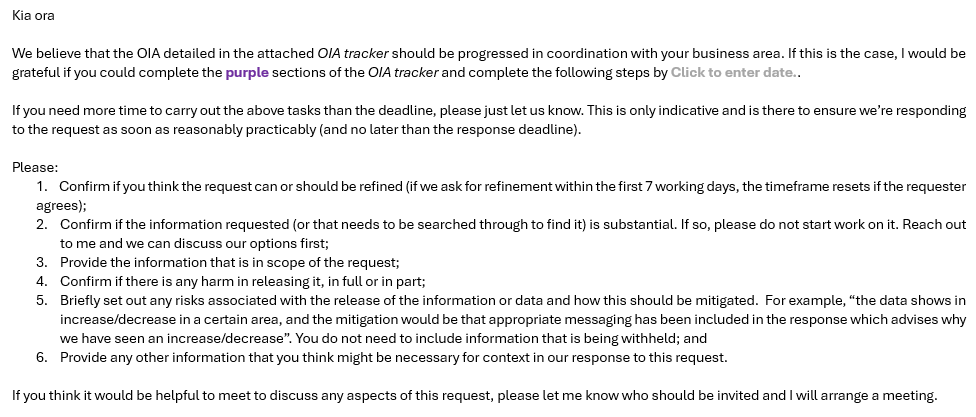
Commissioning emails
Use the templated commissioning email (as below). Please use the
tracker in
sharepoint and ensure the full request is attached also.
1982
Act
Things to do when releasing briefings: Information
1. Under the briefing HNZ number note into the response tab if the briefing has
been released and if so under what OIA. If it has already be released it
doesn’t need to be approved for release/go for noting again.
2. Note in the tracker if the briefing has been released previously and under
what OIA.
Official
3. If being released for the first time note in the tracker who has approved it’s
released with a date. the
Do not ask the briefings team to find the Briefings for you…Do search Dynamics
yourself!
Extensions/decisions
under
You must get approval to extend or decision an OIA. To do that, send an email from
the relevant template in Dynamics to the Principal Advisors who will review the
request.
The email
must have clear explanation as to what ground you wish to extend, and
timeframes/next steps must be outlined also. This process must be followed for both
extensions and decisions.
Released
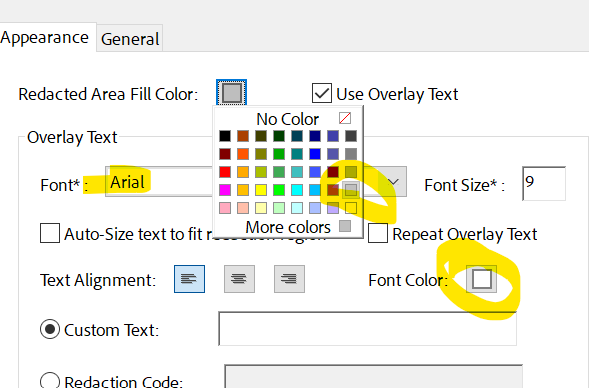
Redactions
Everyone should be using the same format for redactions – which is:
o Grey box
o Arial 9 - white font
1982
Act
Peer reviews/manager reviews
Information
Responses to member of the public OIAs go direct to one of the Principal Advisors
for review. They do not need to go through a separate peer review.
The Principal reviewing will flag any concerns with the manager as required.
Official
All other responses will go through peer review/data review followed by Manager
review.
the
Members of the public
Direct to Principal Advisor for review.
(PA wil flag with Manager any concerns)
Media
Senior peer review followed by Manager review
under
Union
Senior peer review followed by Manager review
Political
Senior peer review followed by Manager review
Ministerial
Senior peer review followed by Manager review
Released
Formatting of tables in responses
Note the formatting for tables is currently being developed. However, the fol owing basic
guidelines should be used for responses.
Guidelines
Where possible tables should be included in the response letter (embedded into the word
document). If this is not possible then a excel spreadsheet can be used.
1982
If a excel spreadsheet is used, please ensure the spreadsheet:
• is labelled at the top of each worksheet with the HNZ reference number
Act
• protected (locked)from any change before it is sent to the requestor.
Where possible, the date the data was extracted should be included in the response and the
standard data caveats should be included in the response letter and the attached
spreadsheet.
Ensure that all data tables are reviewed to ensure they are correct prior to them going for
Senior or Principal Review.
Table and Table notes formatting
Information
Table notes
Table notes are at the bottom of the table, with bullets, and not in the body of the response.
In tables all acronyms should be expanded/defined in the table notes or table title, even if
this already occurred in the primary response.
Formatting
Official
• Arial font, size 11, unless size 10 is needed to get the table to fit onto a page.
• Default page size is A4, portrait orientation. Page size can be up to A3, and
orientation can be landscape to fit information on the page if needed.
the
• Margins can be slimmed to fit information on one page.
• Column and Row titles are bold and right aligned .
• Numerical figures are always right aligned.
• If there are boxes with no data, these should contain a dash ‘-‘.
• Text is left aligned.
under
• Cells are aligned to the top (right click > table properties > cell > top).
• Distribute columns that contain data evenly. (highlight > layout > distribute columns).
Noting an OIA with the Minister’s office
Released
What to send for noting the Minister's Office
Notification is likely to be appropriate where the requested information is, for
example:
• All Media/Political/Union OIA requests; or
• sensitive or controversial in nature: ie New Dunedin hospital/infrastructure,
Kenepuru, change programmes and redundancies etc
Provide the following documents in a single PDF binder to the Manager – who will
send it for noting:
• Tracker
1982
• A signed copy of the response;
• Redboxed documents in scope (if applicable)
Act
In the Manager’s absence the Principal Advisor will ensure relevant OIAs are noted.
Consulting the Minister’s Office
In some situations, it may be appropriate to consult the Minister’s Office, rather than
just send the draft response for noting. This is a slightly different process, as it
means that we should be seeking comment on the proposed approach. The decision
remains HNZ’s to make, but we should be considering the Office’s input before the
decision is made.
Consultation may be appropriate where the Minister: Information
• supplied the information;
• it is about their functions or activities; or
• release could affect their functions or activities or legitimate interests.
Time frame to notify/consult Minister’s Office
Official
Allow for the Minister’s Office to note the response within 5 working days of the date
received. Consultations are usually 5 working days but allow additional time if the
the
response is large.
At the time of commissioning your OIA consider if it needs to be noted – if so, update
the relevant section in Dynamics. This can be done by selecting ‘Yes’ in the Report to
the
Minister required and adding in the date it was sent across in Report Due Date.
under
Minister OIAs
Work directly with the relevant office and ensure you’re using the correct
letterhead/template.
Remember the Private Secretaries do not have Adobe Pro so can’t make redactions
Released
– so with that in mind, when you send a final draft over ensure you send the tracker,
letter, redbox and redacted version as separate files.
Email sweeps for ELT/Board members/commissioners
This process should be followed where you are unable to work with EA’s to collate
emails
.
1. Seek approval for IT sweep from the Head of Government Services & Chief
Legal Counsel (or delegate)
2. Provide OIA details
including question, requester, and due date
1982
3. For ELT/Board members (Commissioner’s, Dep Commissioners or CEO) –
Head of Government Services to advise in writing of the need for an email
sweep (providing the request, requester and due date) and seek and their
Act
approval before commencing.
4. Log ticket with IT for sweep – manual approval request to Head of
Government Services
5. IT provides emails to Head of Government Services for initial review
6. Head of Government Services provides emails to owner (if a member of ELT)
for initial content review
Information
7. Assigned advisor formats emails and provides initial proposed redactions
8. Head of Government Services & Chief Legal Counsel (or delegate) review
9. Reviewed by email owner and redactions confirmed
Official
10. Redactions applied
11. OIA goes through usual approvals process
the
Media team input
For all emails to hnzmedia@, please include the following subject line: OIA – [Query
type] – [Portfolio] - [Requester name] – HNZ000… - CRM:… . The query types will
under
be:
- Wording\lines request
- Consultation
- Media review
If you’re wanting comms lines/contextual information, check the media summary
updates first to see if there is any information you can use.
Released
Don’t forget to BCC in the media inbox when responding to a media OIA.
Communicating with requesters
If you get an email from a requester asking about the status of their OIA you must
respond.
It is also good practice to keep a requester update if there is a delay. Where
possible call to discuss any issues or to seek any clarification, particularly if the
requester is a journalist, as this goes a long way to developing a positive
relationship.
1982
If you are unsure or not comfortable, please ask a senior or principal advisor.
Some of the key points to think about when contacting a requester:
Act
o Write down what you want to say, think about what the top 3 things you want
to get across. End the conversation if you've covered that. Have a script in
front of you around what you want to communicate
o They will likely be frustrated, as they want the info, but don't step into the void
of them not speaking. Think about at what point you should leave the
conversation, early is best
o Most frustrations are due to the lack of engagement until the last minute
o If we know early, e.g. day 10, pick up the phone and preface it
Information
o They're doing a job, just like you
Once we’re building that relationship with the key requesters, this will get easier.
Official
the
under
Released
Document Outline
